Share image

I wanna set own image to social media shares (meta property="og:image)
I put code to HTML/CSS section, but it doesnt work. Code doesnt show up in shops source code.
Please advice.

<meta property="og:image" content="https://****.net/uploads/0_1122.png">

Hi there, can you please let me know your shop URL so we can have a look? Thanks :slight_smile:

Right. Sorry, I understand what you are trying to do. You are trying to change the image you see in the social media post when you share a page of for example the detail page nad you want to show an image of your choice.

This won’t work I’m afraid. You’ll have to live with the automatically generated image or you just upload an image to facebook yourself and share the link below :slight_smile:

In this topic I have a question: When sharing a product to social media is it possible to use a pure white background on the models/product?

Completely new to this world but I love it :smiley:

If your shop is using a white background for models, of course. You can also adjust the backgroundcolor in your shop admin under “Appearance” > “Color & Fonts”

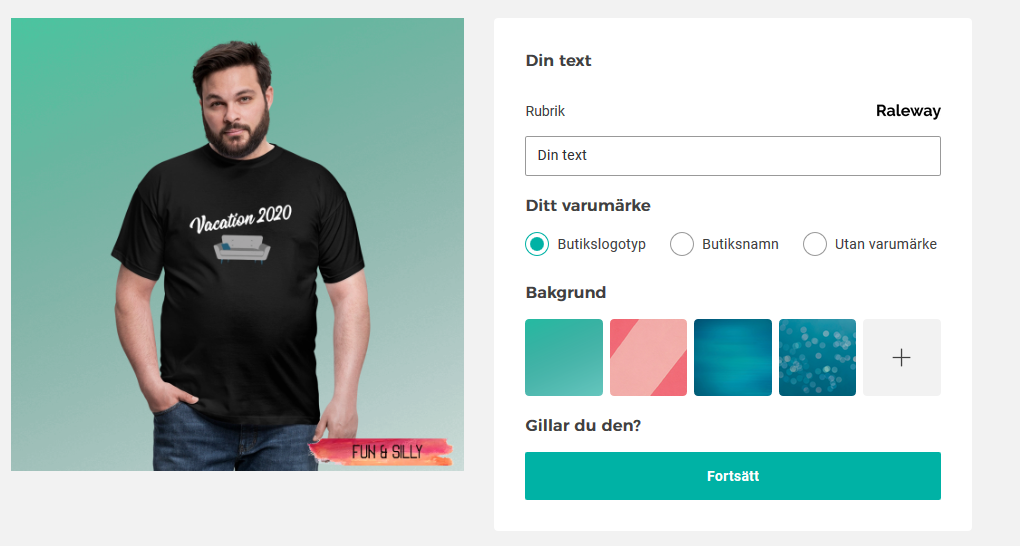
Thanks for quick response Thomas but I think we miss understood each other. What I tried to explain was in the picture were I begin the process to share on social media where I can choose background on the “+” sign there are none ALL white? the closes I find i white with some stripes. Is that correct or am I missing something? :slight_smile:

You are not missing aynthing. We will hopefully be soon adding an option where you can add your own background images :slight_smile: For now you have to use the available backgrounds (there isn’t an all white one).

1 Like

Sorry. I wasn’t aware of how you want to share your product. by using our tool, or by using one of the sharing buttons within the shop.

1 Like

This topic was automatically closed 365 days after the last reply. New replies are no longer allowed.