Custom HTML Header Missing

I have had my shop embedded into a Wordpress site for a while. I’m making major changes and need to edit the custom HTML I have had in place for years. I logged into my Spreadshirt account tonight to discover the custom html header and footer areas are empty. The custom CSS is still visible. I know the custom coding is active because part of it is a snippet to redirect any url that tries to access the site via the shop.spreadshirt link to my custom URL, and that works.

I need to remove that, but do not have access to my custom header anymore.

Please help!

Could you please tell us the shop url, as community mod, we haven’t got access to your account. So I’ll try to help you as I can :slight_smile:

Thanks Thimo,

Spreadshirt url: shop.spreadshirt.ca/truenorthgear

I don’t recall all of the header modifications I made, but I need to remove the script that redirects all hits to the spreadshirt url to my url www.truenorthgear.ca.

Keith

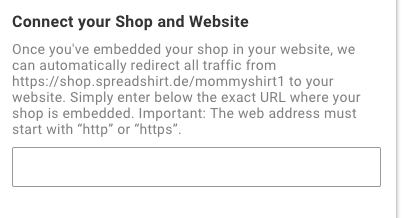
The redirection is located here:
Shop → Advanced Settings → Embed Shop in Website:

05

I’m not sure if the bug still exists that the portal doesn’t allow empty urls, but please try. If not, I can ask some of the colleagues :slight_smile:

1 Like

Thanks Thimo. I forgot about that setting hidden away in there. Many spreadshop versions ago when that didn’t exist, I put the redirect script into the custom header. I thought it was still working that way.

This looks to have done the trick. No to fix the custom CSS I have that was used to format the shop for being embedded.

Thanks again!

1 Like