Hi everyone, when trying to implement Spreadshop to my website, I had to fill in API keys. Where do I create or find these for my shop? I usually log in to the Dutch website and it’s nowhere in my profile. I also tried to open some of the German links (which seem the only European links to actually work) but they just send me back to my normal profile (with no API keys anywhere).
Does anybody know anything about this? Or are there other ways to implement the shop in Wordpress sites?
Hi @gezondergenieten.nl , I use wordpress too. To implement my shop on my website I paste the Javascript code of my Spreadshop.
I’m french so I use the french platform, I don’t know if you will be able to find the exact location of your code in your country’s account but i’ll try :
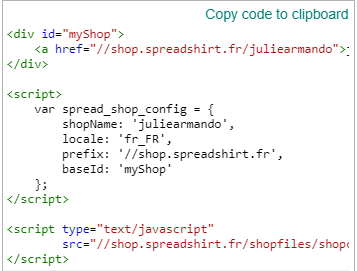
In my account, I go to ‘account setting’, I select my shop with ‘Edit’, then → ‘Advanced settings’ → ‘Embed shop in website’. When I’m on this page I can copy a Javascript code and paste it in a page on my Wordpress site. It works very well (you can see what it’s look like here : http://egayez-votre-quotidien.fr/ ) !
My Javascript code looks like that, yours will have your own spreadshop adress and config (name, language etc) :
If you know a bit about CSS code you can also style your shop adding CSS code directly on the CSS stylesheet of your Wordpress theme.
I hope it will be helpful to you (and sorry about my poor english)
Hi Julie, thanks for your reply! I think I have done something similarly - for the time being I have added an iframe.
@ lovetee: thanks, I had found that link already but for the Netherlands I keep being redirected. As soon as I select the Dutch flag, I will be logged in to my dashboard with no way of registering for a key (or even a search function to look for API or anything related to that). I have mentioned this in my first message as well, but I think I should have added the links I have already used to make that clear.